Compare
Best iPhone calorie tracker
iPhone is not a flavour of Android. The useful shortlist is the apps that treat a notch, a share sheet, and Health as native — and that still let you log a meal when you are holding a fork. Corvex is iOS-only on purpose. This page will not pretend otherwise.
Updated 2026-08-16By Chris RichardsAll comparisons
Corvex wins
- Barcode, recents, and AI lookup free
- No ads on any tier
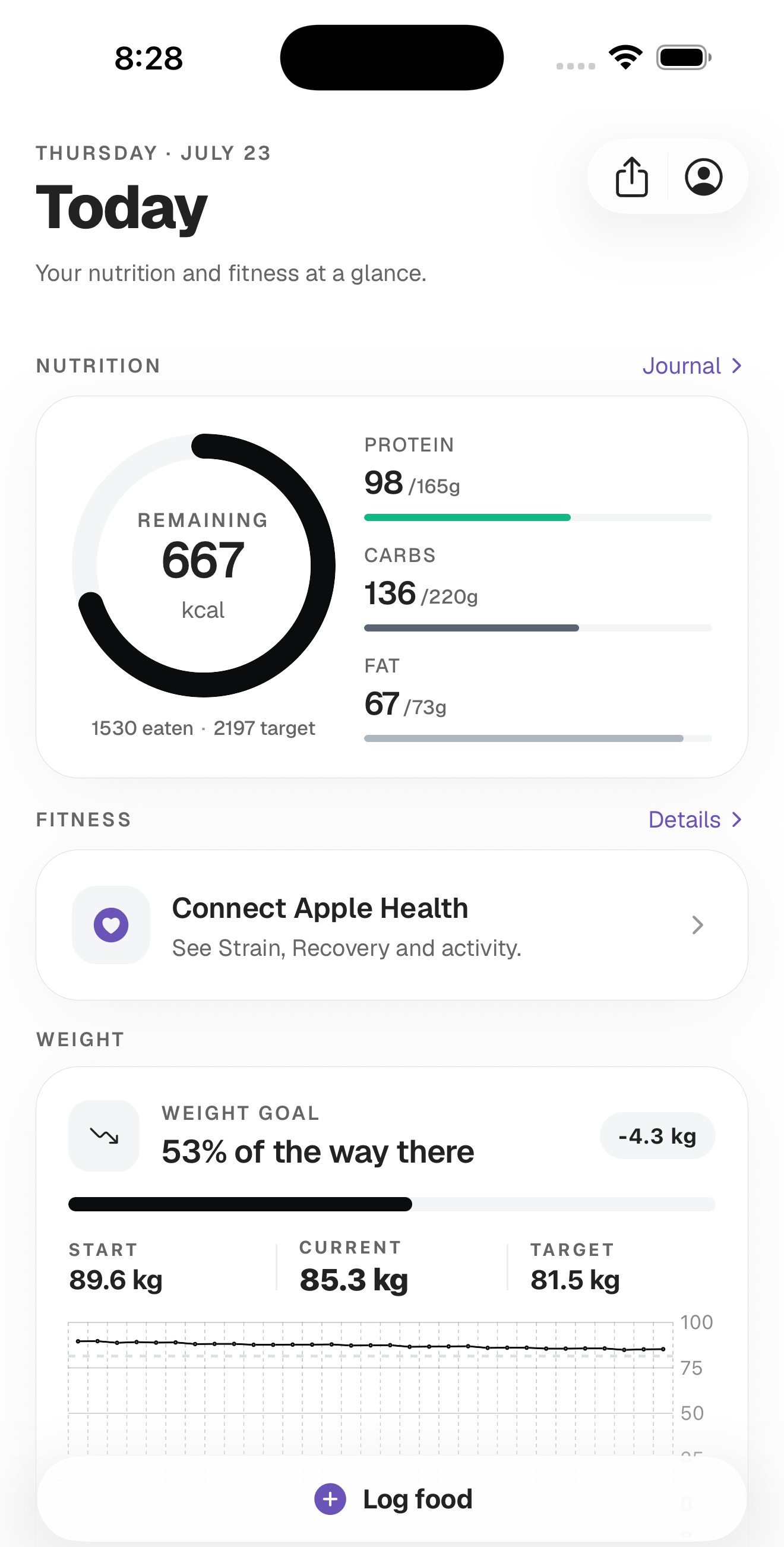
- Calories, macros, and weight in one day view
- Progress stickers made for iPhone sharing
iPhone category wins
- MyFitnessPal and Lose It still win on database breadth
- Cronometer wins on vitamins and minerals
- MacroFactor and Carbon win on paid adaptive coaching
- Every cross-platform app wins if you might leave iOS
Verdict
The best iPhone calorie tracker is the one you still open. On iOS that usually means free barcode and recents, no ads on the daily screen, and a weight trend — not the largest database. Corvex is built to that brief and loses where you need Android, micronutrients, or an adaptive coach.
Best for: iPhone users who want a daily log they will keep, and who do not need a clinical nutrient panel.
The test that survives a redesign
Ignore launch screens. In a week of real meals, answer these on the phone you already own.
- Can you log a repeat breakfast in the time it takes to put the plate in the sink?
- Is barcode scanning on the free tier? MyFitnessPal’s own plan page puts barcode and meal scanning on paid plans.
- Are there ads on the daily view? You will open this screen more than you open Mail.
- Can you log weight and see a trend, not only today’s number?
- Does repeating a meal cost money? Recents are the product.
- Can you share a number without screenshotting a spreadsheet? Optional — but it is why people stay proud of a streak.
How the usual iPhone names actually split
MyFitnessPal is the default because it is the default: huge catalogue, mature barcodes, ads on free, paid scans. Lose It! is the other incumbent, with more lifestyle extras and a free tier that still carries ads. Cronometer is the instrument if iron and the rest of the vitamin panel are the job. Cal AI is the camera-first log, now owned by MyFitnessPal. MacroFactor and Carbon are coaches you subscribe to.
None of those are “bad iPhone apps.” They are different jobs. Rankings that crown one winner are usually affiliate tables. The minimalist and women’s pages unpack two of those jobs in more detail.
Where Corvex sits on that list
Corvex is built as an iPhone daily tracker: describe the meal, scan a barcode, pull recents, or enter macros by hand. Protein, carbs, fat, fibre. Weight with start, current, and target on a trend. No ads. Stickers via the share sheet for Stories. The free tier is the tracker; Premium is depth.
What it does not do: Android, micronutrients, recipe import, in-app community, adaptive expenditure, coaching check-ins, or a MyFitnessPal-sized restaurant database. If any of those is required, pick the app that lists it on the store page and stop reading comparison prose.
Health, Watch, and calories you should not eat
Apple Watch Active Energy is a poor meal ticket. Published error against metabolic carts is large enough to erase a moderate deficit — the Apple Watch calories essay cites the papers. A good iPhone tracker should not require you to import watch burn as extra budget. Corvex does not make that the workflow.
If you might switch to Android next year
Do not start in an iOS-only app. That is not snark; it is data portability. MyFitnessPal, Lose It, Cronometer, Yazio, and MacroFactor will still be there. Corvex will not, until it ships Android. Choose the constraint on purpose.
FAQ
What is the best free calorie tracker on iPhone?
The one whose free tier still logs barcode, recents, calories, macros, and weight without ads. Corvex is built that way. Confirm in the App Store listing and a week of use. The checklist is in the 2026 free tracker essay.
Is Corvex the best calorie tracker overall?
No. It is an iPhone habit app. Cronometer is better for micronutrients. MacroFactor is better for adaptive TDEE. MyFitnessPal is better for obscure packaged food. Those are different first places.
Does Corvex sync with Apple Health?
Use the current App Store listing for the live integration list. This page will not freeze a capability that can ship or change between reviews.
Is there a best calorie tracker for iPad?
Treat it as an iPhone app that may run on iPad. If you need a desktop-class nutrient grid, Cronometer’s wider surface is the more honest answer.
Sources
- [1] MyFitnessPal Premium and Premium+ plan comparison — MyFitnessPal (checked 11 August 2026)
- [2] Burke LE, Wang J, Sevick MA. “Self-monitoring in weight loss: a systematic review of the literature” (2011) — Journal of the American Dietetic Association 111:92–102 (PMID 21185970)
- [3] Bai Y, Hibbing P, Mantis C, Welk GJ. “Assessment of Accuracy of Overall Energy Expenditure Measurements for the Fitbit Charge HR 2 and Apple Watch” (2019) — American Journal of Health Behavior 43:498–505 (PMID 31046881)
General nutrition information, not medical advice. Calorie and macro targets are estimates — talk to a doctor or a registered dietitian before changing your diet, especially if you are pregnant, managing a health condition, or have a history of disordered eating.
Get the app
Open Corvex on your iPhone
Track calories, weight, and macros in a daily log you will actually keep — then share progress stickers in one tap.